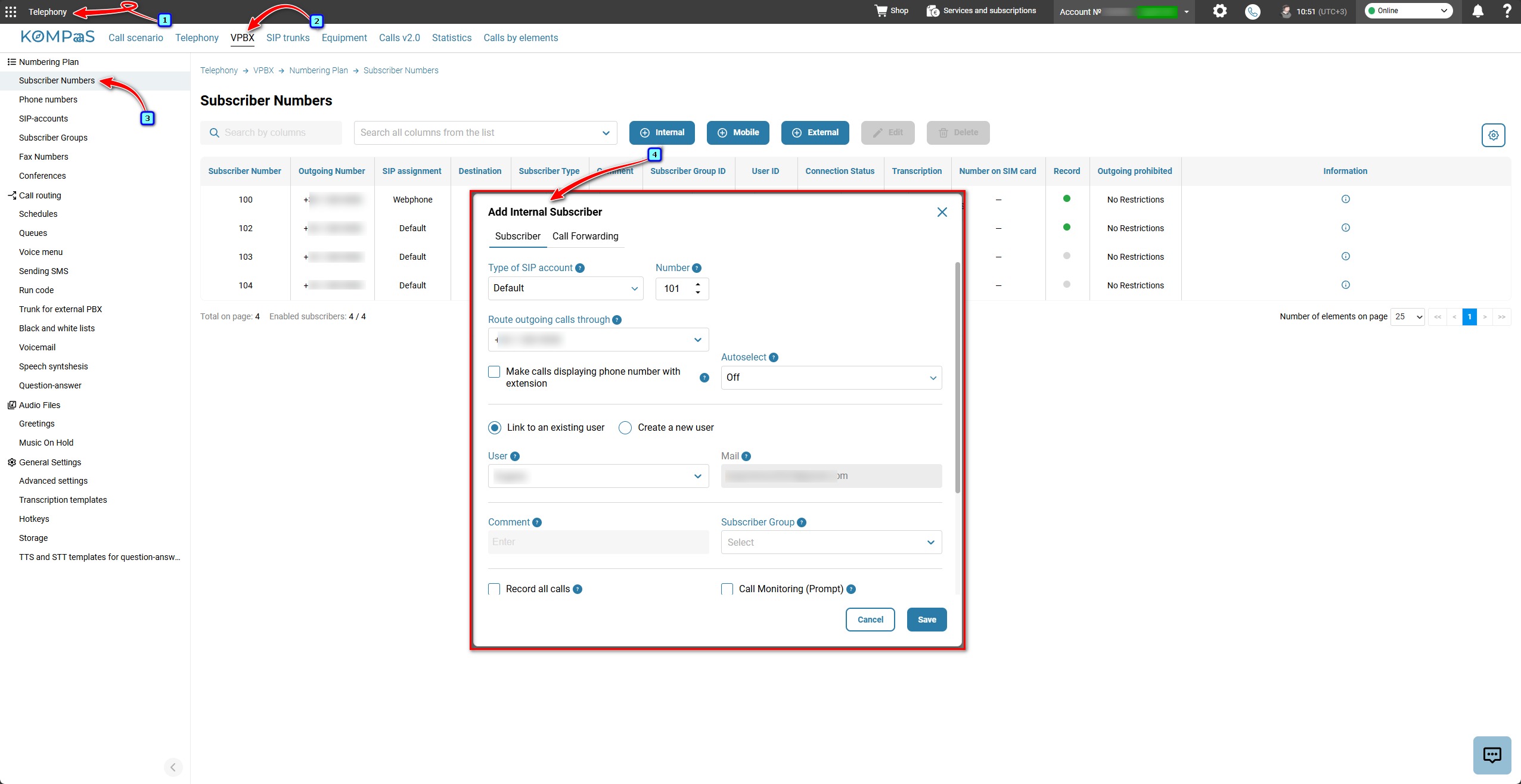
To add an extension (Internal) number in the Telephony section → VPBX tab→ Numbering Plan → Subscriber Numbers and press the 'Internal' button.
Internal subscriber parameters:
Number — The extension number can contain from 1 to 4 digits and is configured in the Virtual PBX settings. By default, extension numbering starts at 100. The numbering plan is common to the entire Virtual PBX. If three-digit numbers are selected, all numbers on the VPBX must be three-digit numbers.
Subscriber name — an identifier used to simplify number management.
Route outgoing calls through — This can be a landline, mobile, or nomadic number.
Record all calls — Recorded conversations can be listened to in the 'Calls (v2.0)' section. The recording option is available only if the 'Call recording' service is enabled.
Do not intercept incoming calls — Call interception can help when assisting a customer if an agent has difficulty answering or is urgently needed on another line. For more information about the 'Call Transfer' function, see 'Call Transfer and Call interception setup'.
Call Monitoring (Prompt) — For more information about the 'Call shadowing' function, see 'Call shadowing (Promter)'.
Outgoing Call Management — For the subscriber to make calls to allowed destinations, these destinations must also be enabled on the phone number through which the call is made. If a destination is disabled on the phone number, the subscriber will not be able to make a call to that destination even if calls to it are allowed for the subscriber. For more information, see 'Configuring outbound routing for a phone number'.
Transcribe calls — The option works under the following conditions:
The 'Call recording' service is enabled;
The 'Transcribe calls' service is enabled;
The 'Record all calls' checkbox is selected.
User — select the employee who is granted access to the subscriber's call recordings and can make calls via the softphone. See 'Virtual PBX user'.
Additionally, the following settings are configured for each internal subscriber:
Personal call forwarding. See 'Call forwarding setup'.
Subscriber VoIP equipment (SIP account). See 'How to get a SIP account password'.
Subscriber Group — a group with predefined settings that will be applied to subscribers included in this group. For more information, see 'Subscriber groups'.
Also see:
How to set up an External number
Was this article helpful?
That’s Great!
Thank you for your feedback
Sorry! We couldn't be helpful
Thank you for your feedback
Feedback sent
We appreciate your effort and will try to fix the article